

Skip to main content Skip to search

Archives for August 2025

Converting from QuickBooks Desktop to QuickBooks Online — Without Losing Data

 Introduction

As businesses embrace a digital-first world, many are shifting from traditional desktop accounting software to cloud-based solutions that offer greater flexibility, real-time access, and improved collaboration. For U.S. businesses and CPA firms, transitioning from QuickBooks Desktop (QBD) to QuickBooks Online (QBO) is a strategic step forward. However, one major concern often arises  the risk of data loss. With careful planning and the right process, this migration can be smooth, accurate, and reliable, keeping your financial records intact.

What to Know Before You Convert

Migrating from QuickBooks Desktop to QuickBooks Online can be a smart decision, but it’s important to prepare properly. Not every feature or piece of data transfers seamlessly, so having the right expectations is key. Here are the important things to know before you move:

1. Incomplete Data Migration

  • Some details like audit trails, advanced custom reports, and recurring transactions may not fully transfer during the migration process
  • The switch from Average Cost in Desktop to FIFO in Online can create variations in your reported inventory values.


2. Maximum file capacity

  • Instead of migrating everything, you may be required to keep older data archived and shift only the last few years.

3. Feature Differences

  • QuickBooks Desktop offers advanced reporting, specialized industry editions, and robust job costing features that QuickBooks Online may not completely match.
  • QuickBooks Online, on the other hand, offers automation, real-time access, and integrations that Desktop lacks.

4. Securing your data through regular backups

  • Make sure to back up your Desktop data first to avoid any risk of data loss during migration
  • This ensures you can access historical data if needed in the future.

QuickBooks Desktop vs QuickBooks Online: Extended Comparison

FeatureQuickBooks DesktopQuickBooks Online
AccessInstalled on one computer; remote access needs hostingCloud-based, accessible anywhere via web or mobile app
ReportingStrong custom reporting with advanced featuresGood standard reports, fewer customization options
AutomationLimited automation (manual data entry, reminders)Automatic bank feeds, invoicing, bill pay, reminders
Inventory TrackingAverage Cost method onlyFIFO method (may impact valuations during migration)
PayrollDesktop payroll add-on; updates require downloadsFully cloud-based payroll with automatic tax updates
IntegrationsFewer integrations, mostly desktop appsHundreds of third-party app integrations (CRM, eCommerce, etc.)
Cost StructureOne-time license or annual renewalMonthly subscription, scalable by plan


Future-Proof Your Business with QuickBooks Online
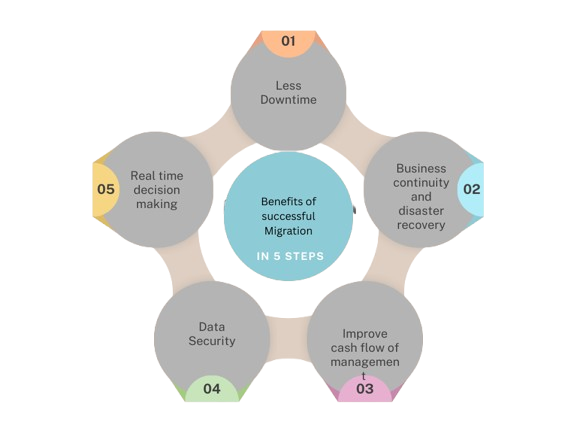
Conclusion:

QuickBooks Online empowers you with anywhere access, real-time collaboration, and simplified processes that let you focus more on growth and less on administration. The key is ensuring your migration is handled with care.

If you’d rather not deal with the technical details, our team at Kariwala & Co. LLP is here to help. We specialize in QuickBooks migrations, ensuring accuracy, security, and peace of mind at every step. Let us take the complexity off your plate  so you can enjoy the benefits of QuickBooks Online without the stress.



Read more

Why Payroll Accuracy Matters for Every Business

When it comes to running a business, few things are as important as paying employees correctly and on time. Payroll accuracy goes beyond numbers — it’s about building trust, staying compliant, and ensuring the overall health of your organization.

Yet, many businesses struggle with payroll errors that cost money, time, and employee goodwill. Here’s why payroll accuracy should be a top priority — and how outsourcing can make the process seamless.

Why Payroll Accuracy is Essential

Builds Employee Trust and Morale

Payday is personal. When employees consistently receive accurate and timely paychecks, it fosters trust and loyalty. Mistakes or delays, on the other hand, can harm morale and even lead to turnover.

Ensures Compliance with Laws

Payroll errors can result in serious legal and financial consequences. Issues like failing to pay minimum wage, misclassifying employees, or incorrect tax withholdings may lead to fines, penalties, or audits.

Saves Money and Time

Fixing payroll mistakes takes valuable resources and may result in overpayments that are difficult to recover. Ensuring accuracy from the start helps businesses avoid unnecessary costs and administrative burdens.

How Outsourcing Payroll Ensures Accuracy

Partnering with experienced professionals helps reduce risk and streamline payroll. At Kariwala & Co. LLP, we support U.S.-based companies by offering:

  • Experienced Payroll Specialists – Our team keeps pace with evolving U.S. federal and state payroll laws.
  • Advanced Payroll Software – Trusted tools minimize human error and improve accuracy.
  • Regular Audits – Payroll reports and tax filings are reviewed for discrepancies before they become problems.
  • Confidentiality & Security – Employee data is protected with strict confidentiality protocols.

Benefits for U.S.-Based Companies

Outsourcing payroll with Kariwala & Co. LLP provides:

  • Peace of mind that employees are paid correctly and on time.
  • Compliance with ever-changing federal and state laws.
  • More time for leadership to focus on business growth.
  • Cost savings compared to managing payroll in-house.

Conclusion

Payroll accuracy is not an option — it’s a necessity. It strengthens employee trust, ensures compliance, and keeps operations running smoothly.

With Kariwala & Co. LLP as your payroll outsourcing partner, you can rest easy knowing your payroll is in expert hands — allowing you to focus on growth while we handle the calculations.


Read more

Understanding Fundamental Accounting: The Core of Sound Financial Decision-Making

Financial statements are not just numbers—they’re a language. A language that communicates the financial health, stability, and future potential of a business. To speak this language effectively, one must understand the foundational principles that govern financial reporting.

Whether you’re a startup founder, a manager at a growing enterprise, or a CPA advising clients, these fundamental concepts form the bedrock of all financial decision-making.

Why Financial Reporting Matters

Financial statements are prepared according to established guidelines to ensure consistency, transparency, and comparability. As outlined by the Financial Accounting Standards Board (FASB) in its Statement of Financial Accounting Concepts No. 1, the main objective of financial reporting is:

“To provide information that helps existing and potential investors, creditors, and other users assess the amounts, timing, and uncertainty of prospective net cash inflows to the enterprise.”

Core Accounting Concepts

To prepare financial statements accurately, certain key accounting principles must be followed:

ConceptExplanation
Going ConcernAssumes the business will continue operating for the foreseeable future.
Accruals & MatchingRevenues and related expenses should be recorded in the same accounting period.
PrudenceWhen in doubt, understate rather than overstate profits or asset values.
ConsistencySimilar items must be treated consistently across periods.
Entity ConceptThe business is distinct from its owners or stakeholders.
Money MeasurementOnly transactions measurable in monetary terms are recorded.
Separate ValuationEach asset or liability must be valued individually.
MaterialityOnly items significant enough to influence decisions are considered.
Historical CostTransactions are recorded at their original cost.
RealizationRevenue is recorded only when it is earned or realized.
DualityEvery transaction has two equal and opposite effects (debit and credit).

Components of Fundamental Accounting

At Kariwala & Co. LLP, we view fundamental accounting as more than just record-keeping—it’s a powerful tool that enables clarity and confidence in business decisions.

ComponentDescription
Double-Entry SystemEvery transaction affects two accounts, ensuring books stay balanced.
Journal EntriesRecords all day-to-day transactions in chronological order.
Ledger AccountsGroups transactions under specific categories like Sales, Cash, Expenses, etc.
Trial BalanceA summary to verify that total debits equal total credits.
Financial StatementsIncludes the Balance Sheet, Income Statement, and Cash Flow Statement.
ReconciliationEnsures internal records match external sources like bank statements.

Why It Matters: Different Stakeholder Perspectives

For Business Owners & Managers

  • Make informed strategic decisions
  • Monitor profitability and growth
  • Maintain control over budgets

    Insight: A clear understanding of your numbers reduces surprises and builds investor trust.

For Investors & Financial Institutions

  • Evaluate financial health before investing or lending
  • Assess risk and return
  • Demand transparency and consistency

    Insight: Sound accounting attracts funding and strengthens relationships with banks and VCs.

For Government & Regulators

  • Ensure tax compliance
  • Adhere to GAAP or IFRS standards
  • Create auditable financial trails

    Insight: Accurate reporting avoids fines and legal complications.

Conclusion: Accounting is More Than Compliance

Fundamental accounting isn’t just a regulatory requirement—it’s a strategic advantage. When done right, it empowers business leaders, satisfies stakeholders, and secures the financial future of your enterprise.
At Kariwala & Co. LLP, we help U.S.-based CPA firms and their clients stay grounded in these principles—ensuring accuracy, clarity, and confidence every step of the way.
Let your books tell a story you can stand behind.


Have questions about implementing these principles in your business? Contact our team to learn more about how Kariwala LLP supports your accounting journey.

Read more