
Why QuickBooks Cleanup Becomes Necessary
As companies grow, change accountants, or outsource bookkeeping, their QuickBooks files can develop errors like duplicate entries, incorrect balances, uncleared transactions, and automation issues. These inaccuracies hinder financial accuracy, complicating tax preparation, audits, and financial statement generation. A structured QuickBooks cleanup process identifies and corrects these issues, ensuring the system accurately reflects financial health. Both QuickBooks Online and Desktop require this cleanup, though methods differ due to their distinct designs and automation handling.
QuickBooks Cleanup Process: Step-by-Step Framework
A structured cleanup process typically follows these steps:
- File assessment and backup
- Review of chart of accounts
- Verification of opening balances
- Cleanup of duplicate and incorrect transactions
- Correction of automation rules (Online)
- Structural corrections and rebuild (Desktop)
- Sequential bank reconciliation
- Financial report verification
This systematic approach ensures complete restoration of accounting accuracy.
Accessibility and Remote Working Capability
This subtopic explains how easily users can access QuickBooks and work remotely.
QuickBooks Online:
QuickBooks Online is a cloud-based accounting software accessible via a web browser from any location, supporting remote teams, external accountants, and businesses with multiple branches without requiring local software installation.
QuickBooks Desktop:
QuickBooks Desktop is installed on a local system. Access is limited to the computer where it is installed unless remote access tools or hosting services are used. This makes it less flexible for remote teams.
Why this matters:
Businesses with remote employees, outsourced accounting firms, or multiple locations benefit more from QuickBooks Online due to its accessibility.
Bank Reconciliation Cleanup and Correction Process
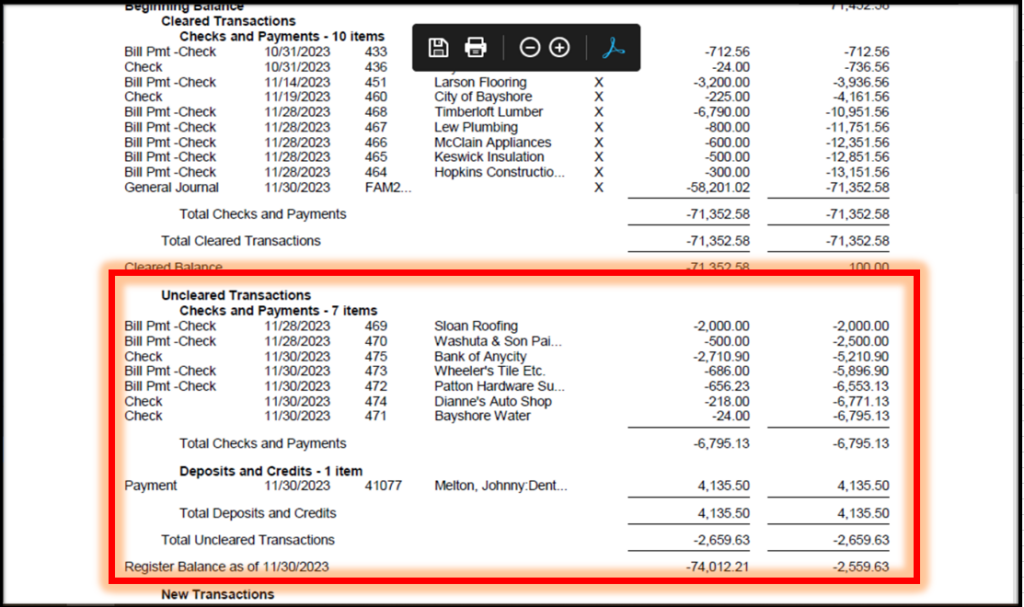
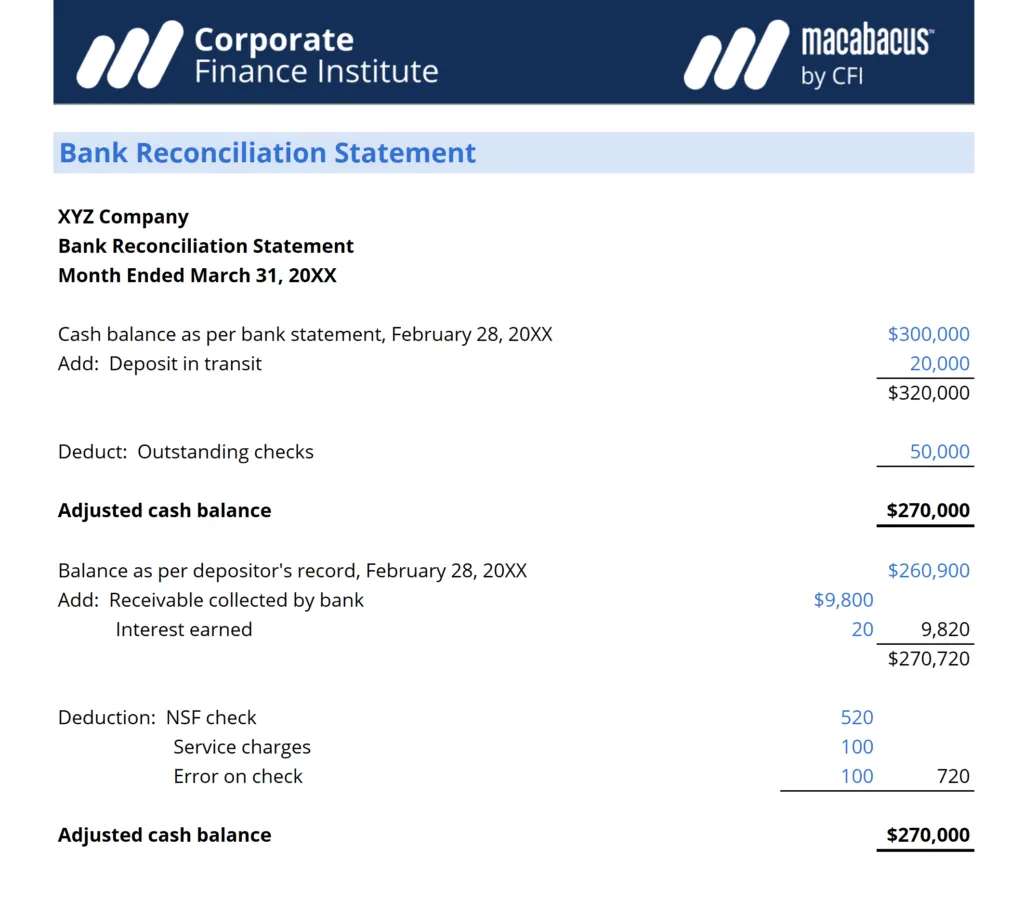
Bank reconciliation is the foundation of accurate accounting.
Cleanup involves:
- Identifying missing transactions
- Removing duplicate entries
- Correcting incorrect postings
- Ensuring balances match bank statements
Reconciled transactions must never be deleted. Corrections should always address the original error rather than forcing adjustments.
Proper reconciliation ensures accurate financial reporting and audit readiness.
Data Backup, Security, and Risk Protection
This subtopic explains how financial data is protected in both versions.
QuickBooks Online:
QuickBooks Online automatically backs up data in secure cloud servers. It uses encryption, secure login, and advanced security layers. There is no risk of losing data due to system failure or hardware damage.
QuickBooks Desktop:
QuickBooks Desktop requires manual backups or scheduled backups. If backups are not maintained properly, there is a risk of data loss due to system crashes, hardware failure, or viruses.
Why this matters:
Automatic backups in QuickBooks Online provide better protection and reduce risk, while Desktop requires more manual responsibility.
Common Problems Identified During QuickBooks Cleanup
The most frequent issues found during cleanup include:
- Duplicate transactions from bank feeds
- Incorrect automation rules
- Unreconciled bank accounts
- Incorrect opening balances
- Payroll liability discrepancies
- Inventory valuation errors
- Improper use of undeposited funds
- Incorrect journal entries
These issues accumulate over time and reduce financial reliability.
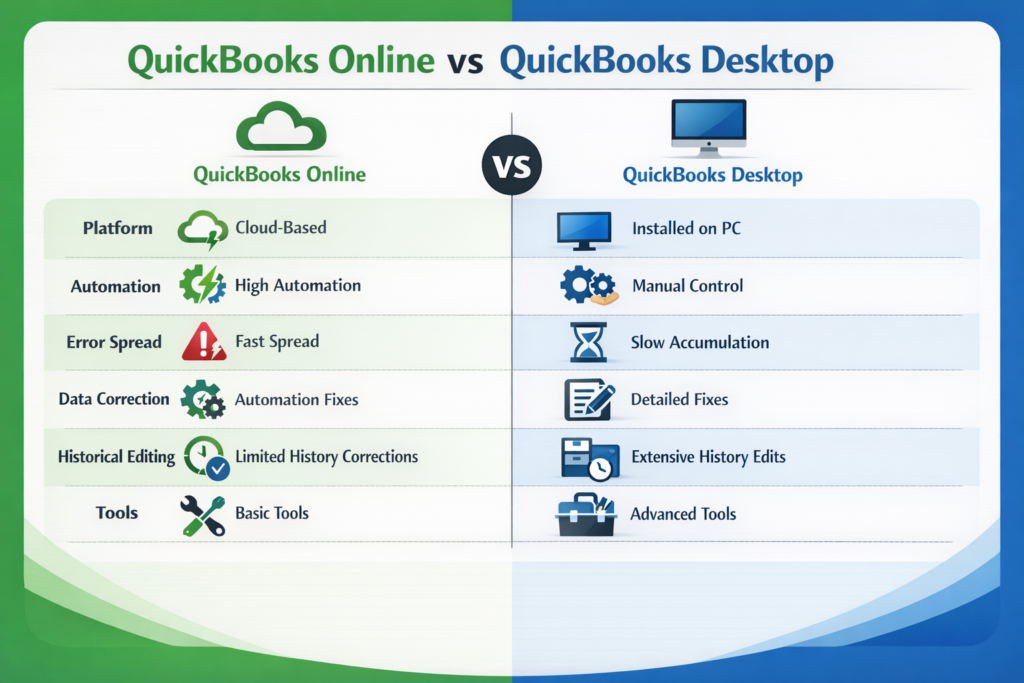
Key Differences: QuickBooks Online vs Desktop Cleanup
Business Benefits of Proper QuickBooks Cleanup
Proper cleanup provides significant benefits:
- Accurate financial reporting
- Reliable tax filing
- Audit readiness
- Better business decision-making
- Smooth outsourcing transition
- Improved financial transparency
Clean books improve operational confidence and financial control.
When Professional Cleanup Support Is Recommended
Professional cleanup is necessary when:
- Multiple years require correction
- Reconciliations are incomplete
- Financial reports are unreliable
- Business is preparing for audit
- Business is transitioning to outsourced accounting
Conclusion:
QuickBooks cleanup ensures financial accuracy, reliable reporting, and readiness for compliance, audits, and growth. QuickBooks Online and Desktop need distinct cleanup methods due to their differing operations. Proper assessment, automation control, reconciliation maintenance, and error correction restore confidence in financial data, resolving current issues and building a foundation for sustainable financial management.
Reference:
Bank reconciliation and bookkeeping best practices