
Moving to a new accounting system is more than transferring financial records from one platform to another. It is an opportunity to eliminate outdated information, correct errors, improve reporting structures, and establish a cleaner financial foundation.
However, if poor quality data is transferred, the new system may simply inherit the same problems. The goal should not be to move all data, it should be to move the right data accurately.
1. Begin With a Financial Data Review
Before migration, conduct a complete review of the existing accounting system.
Focus on:
- Chart of accounts
- Bank and credit card accounts
- Accounts receivable and payable
- Customer and vendor records
- Fixed assets
- Inventory
- Historical transactions
- Journal entries
This initial review helps identify what is reliable, what needs correction, and what does not need to be migrated.
2. Clean the Data Before Moving It
Data cleaning should happen before, not after, migration.
Remove or correct:
- Duplicate customers and vendors
- Inactive accounts
- Incorrect classifications
- Outdated records
- Duplicate transactions
- Inconsistent naming conventions
A simple rule:
Clean data → Better migration → Better reporting
A new accounting system cannot compensate for inaccurate information entering it.
3. Reconcile All Critical Accounts
Reconciliation is one of the most important controls before migration.
| Account | What to Verify |
| Bank | Compare with latest statements |
| Credit Cards | Match outstanding balances |
| Accounts Receivable | Verify customer balances |
| Accounts Payable | Confirm unpaid bills |
| Loans | Match lender statements |
The objective is to ensure that the balances being transferred represent the actual financial position of the business.
4. Review the Chart of Accounts
Do not automatically copy the old Chart of Accounts into the new system.
Look for accounts that are:
Duplicate → Unused → Misclassified → Outdated → Unnecessarily Detailed
The new structure should support the organization’s current reporting needs.
For example, instead of maintaining multiple confusing expense accounts for similar purchases, businesses can create a cleaner and more logical structure that makes financial reporting easier to understand.
5. Decide What Historical Data to Migrate
More data does not necessarily mean better data.
Before migration, determine whether the business needs:
Full History
Detailed historical transactions remain available in the new system.
Selective History
Only relevant historical periods or transactions are migrated.
Opening Balances + Archive
Current financial information moves to the new system while older records remain securely archived.
The right approach depends on reporting requirements, system capabilities, record retention needs, and future access requirements.
6. Map the Old Data to the New System
Different accounting platforms use different structures, account numbers, categories, and reporting dimensions.
A proper mapping exercise ensures that information reaches the correct destination.
| Existing Data | New System |
| Old Account | New Account |
| Vendor Category | Vendor Classification |
| Department | Department |
| Project Code | Project |
| Customer Type | Customer Category |
Mapping should be finalized before the actual migration begins.
7. Verify Customers, Vendors & Open Transactions
Master data requires special attention because errors here can affect reporting and payment processes.
Review:
- Duplicate vendors
- Duplicate customers
- Open invoices
- Unpaid bills
- Customer credits
- Vendor credits
- Unapplied payments
- Old outstanding balances
This ensures the new system starts with meaningful and current financial information rather than historical clutter.
8. Create a Pre Migration Financial Snapshot
Before switching systems, save key reports from the existing accounting platform.
Recommended reports:
These reports become the baseline for comparing the old and new systems after migration.
9. Test Before Going Live
Never make the first migration the final migration.
Follow this process:
Test Migration → Compare Data → Identify Differences → Correct Errors → Retest → Final Migration
During testing, verify:
- Account balances
- Customer and vendor balances
- Open invoices and bills
- Transaction counts
- Reporting categories
- Financial statements
A test migration allows finance teams to discover problems before they affect live accounting operations.
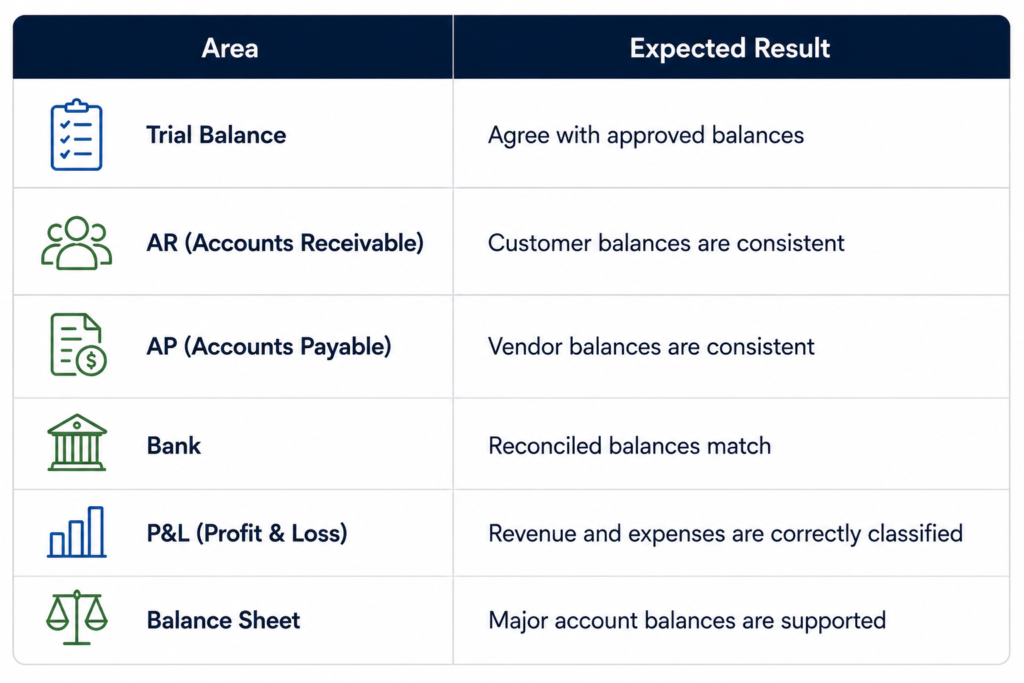
10. Validate the New System After Migration
Migration does not end when the data appears in the new platform.
After migration, compare the new system against the pre-migration financial snapshot.
Check the following:Any unexplained difference should be investigated before the new system becomes the primary source of financial reporting.
The Financial Data Migration Checklist
A successful migration can be summarized in five stages:
| Review | Understand what data exists. |
| Clean | Remove errors, duplicates, and unnecessary records. |
| Reconcile | Confirm that important balances are accurate. |
| Map & Test | Connect old data structures to the new system and perform a test migration. |
| Validate | Compare the migrated information with the approved financial records. |
Conclusion:
Implementing a novel accounting system should establish a renewed financial framework, rather than perpetuating existing accounting challenges. Enterprises that dedicate resources to data cleansing, reconciliation, mapping, testing, and validation can mitigate migration-related risks while enhancing the integrity of their subsequent financial disclosures.
Addressing deficiencies in accounting data is most effectively accomplished prior to its transfer.